Hard Suspension vs Soft Suspension: Understanding the Difference
When Google suspends your Business Profile, it feels like the digital lights have been turned off. We see this panic every day with business owners who suddenly stop receiving calls.
Understanding exactly what type of suspension you are dealing with is crucial. The two main types—hard suspensions and soft suspensions—require different approaches and carry different implications for your revenue.
Our team has managed hundreds of GBP reinstatement cases across the US. Recovery depends entirely on identifying the specific penalty accurately.
Let’s look at the data, what it actually tells us, and then explore practical ways to respond.
What is a Hard Suspension?
A hard suspension is the nuclear option in Google’s penalty system. It is the most severe action the platform can take against a local business.
When your profile receives a hard suspension:
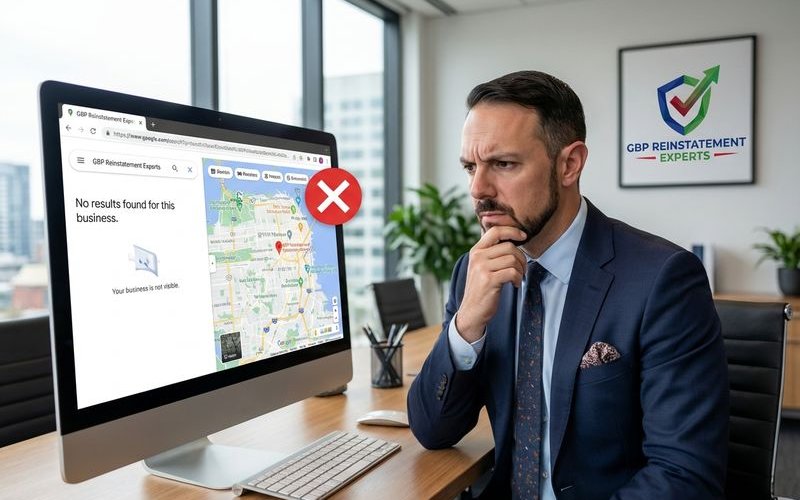
- Your listing completely disappears from Google Maps and local search results.
- Customers cannot find you even when searching for your exact business name or phone number.
- You cannot access the core features of your profile to make edits.
- All associated data (including your hard-earned reviews and photos) becomes invisible to the public.
Hard suspensions typically occur when Google’s automated systems or manual reviewers decide the listing does not qualify for a Business Profile at all. This often happens under the “Deceptive Content” or “Quality Issues” guidelines.
Common Causes of Hard Suspensions
We find that hard suspensions usually stem from violations that Google considers fundamental.
These are the specific triggers we see most often in 2025:
- Business name violations: Adding keywords (like “Best Plumber”) or city names to your business name when they are not on your legal registration.
- Address issues: Listing a P.O. Box, a UPS Store, or a virtual office (like a Regus or WeWork location) without permanent signage and staff.
- Category misuse: Claiming regulated categories (like “Locksmith” or “Garage Door Repair”) without proper state licensing.
- Spam patterns: Creating multiple listings for the same service area to dominate the map.
- Failed verification: Failing a video verification request or repeated attempts to verify via postcard at different addresses.
- Account-level flags: If the Google account managing the listing has been flagged for suspicious activity, every listing it manages may be suspended simultaneously.
Pro Tip: Check your “Business Profile ID” in the settings. If it is still visible but the listing is down, you have a better chance of recovery than if the ID itself has been wiped from the database.
What is a Soft Suspension?
A soft suspension is less destructive but still creates a significant administrative headache.
With a soft suspension:
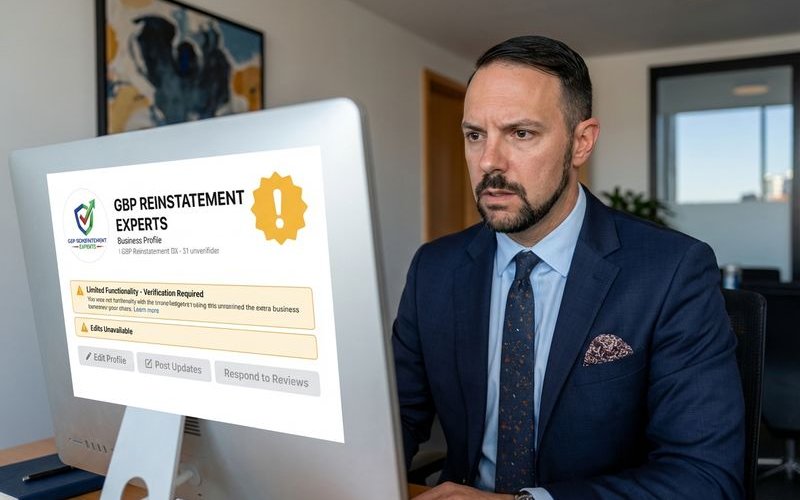
- Your listing remains visible in Google Maps and Search.
- You lose owner control and cannot update hours, posts, or photos.
- The “Unverified” label often appears on the backend dashboard.
- You cannot respond to new reviews.
- Someone else could claim the listing if it appears unclaimed.
Soft suspensions often look like a “Re-verification Request.” Google basically admits the business exists but doubts you are the current, authorized owner or that the data is current.
Common Causes of Soft Suspensions
These suspensions are usually triggered by data inconsistencies rather than policy malice.
Common triggers include:
- Address changes: Editing your address or service area significantly can trigger an automatic trust check.
- Inactivity: Letting a profile sit dormant for over 12 months without logins or posts.
- Data conflicts: When data aggregators (like Yelp or YellowPages) show a different phone number than what is on your Google Profile.
- Ownership disputes: If a former employee or marketing agency tries to claim the listing, Google may lock everyone out until ownership is proven.
- Category Edits: Changing your primary category (e.g., from “HVAC Contractor” to “Plumber”) often triggers an instant soft suspension for re-verification.
Key Differences at a Glance
We use this framework to quickly diagnose client issues.
| Aspect | Hard Suspension | Soft Suspension |
|---|---|---|
| Visibility | Listing removed completely | Listing still visible to public |
| Dashboard Message | ”Suspended” or “Disabled" | "Suspended” or “Verification Required” |
| Reviews | Hidden/Inaccessible | Still visible to customers |
| Revenue Impact | Immediate total loss of leads | Minimal (unless edits are urgent) |
| Recovery Path | Formal Appeal & Documentation | Re-verification (Video/Postcard) |
| Typical Timeline | 3 to 14+ Business Days | 1 to 5 Business Days |
How to Identify Your Suspension Type
You need to diagnose the issue before you attempt a fix. A wrong diagnosis can lead to a rejected appeal.
Follow this quick check:
- Search for your business in Google Maps by name and city.
- Search for your address directly in Maps to see if the pin exists.
- Try to access your GBP dashboard.
If the listing is totally gone from Maps, it is a hard suspension. If the listing is there but asks you to “Verify Now” or says “Suspended” while still showing up in search, it is a soft suspension.
Recovery Approaches
The recovery process is strict. One mistake in your documentation can lead to a permanent denial.
Recovering from a Hard Suspension
We approach hard suspensions like a court case. You must prove your business is real and eligible.
The Hard Suspension Protocol:
- Identify the exact violation: Read the “Guidelines for representing your business on Google” carefully.
- Fix the root cause: Remove keywords from your name, delete the virtual office address, or correct your website URL.
- Gather documentation: This is the most critical step. You need a utility bill (gas, electric, water) dated within 90 days. The name and address on the bill must match your Google Profile exactly.
- Submit a proper appeal: Use the official Google Business Profile appeals tool. Upload your business license and utility bill.
- Wait for the verdict: Do not submit multiple appeals. This resets your place in the queue.
Warning: Google creates a “ticket” for your appeal. If you email them repeatedly, you clog the system. Current wait times in the US average between 3 and 7 business days for an initial response.
Recovering from a Soft Suspension
Soft suspension recovery is usually technical rather than legalistic.
The Soft Suspension Protocol:
- Click “Verify Now”: Log into your dashboard and select the verification option.
- Prepare for Video Verification: In 2025, this is the default method. You will need to record a continuous video showing your street sign, unlocking your door, and your tools or payment terminal.
- Resolve data conflicts: Ensure your website footer address matches the address you are verifying.
- Audit User Access: Remove any old managers or agencies from the profile who might have triggered the flag.
Soft suspensions usually resolve as soon as the verification is processed.
Prevention Tips
We tell clients that defense is cheaper than recovery.
- Keep your business name clean: Use your legal name as it appears on your tax documents. Do not add “24/7” or city names unless they are legally registered.
- Maintain accurate information: Ensure your hours, phone number, and website are consistent across Facebook, Apple Maps, and Bing.
- Follow verification properly: If Google asks for a video, do not try to force a postcard option. It rarely works.
- Avoid bulk changes: Do not change your name, address, and category all in the same 24-hour period.
- Monitor your listing: Check your profile weekly. Suggest edits from users (like “Place is closed”) can sometimes trigger suspensions if ignored.
When to Get Professional Help
The appeals process can be unforgiving.
Consider professional assistance if:
- Your first appeal was rejected with a generic automated response.
- You operate in a high-risk category (Locksmith, Garage Door, Personal Injury Lawyer).
- You have multiple locations suspended simultaneously.
- Your business is losing significant revenue every day the listing is down.
- You are unsure specifically why you were suspended.
Our team specializes in complex reinstatement cases. We know how to package the evidence in the format Google’s internal support teams require.
Next Steps
Understanding your suspension type is the first step toward recovery. Once you know what you are dealing with, you can take the appropriate action to restore your Google presence.
If you are unsure about your suspension type or need help with recovery, our free audit can provide clarity on your specific situation.
GBP Reinstatement Experts
Our team of GBP reinstatement experts has helped over 12,500 businesses recover their suspended Google Business Profiles.
Learn more about our team →